"Any significantly advanced technology is indistinguishable from magic." - from Arthur C. Clarke's Three Laws of prediction.
Wednesday, September 25, 2013
Check out the civilian side of the Federation in this animated fan series
Ever wonder about all the jumpsuit-clad civilians the Enterprise encounters in Star Trek? Clearly, the producer of Star Trek: Aurora does. Set in the TOS era, Aurora follows the two-woman crew of a small merchant vessel, whose adventures rival that of the Enterprise itself.
The first Aurora episode became available (in its entirety) late last year, and is a very impressive work considering its one-man production crew. The plot includes plenty of back story on Aurora's captain, a trip to an alternate reality, and of course, a look at a side of the Federation only hinted at previously. This entire 'pilot film' is available for viewing on the Aurora website and is highly recommended. Don't let the fact that this is an animated/CG feature scare you away -- it's a very high quality production and most definitely worth watching.
A second episode is currently in production, with a rough segment available for viewing on the aforementioned webpage. It's looking like Harry Mudd, the infamous con-man from several episodes of TOS, returns, and we all know what that means: trouble...
Give Star Trek: Aurora a try and see what adventure awaits hidden beyond the final frontier. After all, we can't let Kirk, Spock, and McCoy have all the fun :-)
Thursday, September 19, 2013
Sony MDR-ZX100 Stereo Headphones - A Review
I've been in the market for a decent set of stereo headphones for some time now. I was getting tired of dealing with cheap ear buds that were constantly breaking or wearing out. The Sony MDR-ZX100 ended up being a pretty good solution.
Running only $15 USD on Amazon, these headphones are a great deal. Will they give you the sound quality of a pair of Bose? Probably not, but for casual listening of music and games, the semi-portable ZX100 puts out good-enough quality audio (Note these do not have any noise-reduction capability). Coming in either white or black, the headphones are fairly comfortable to wear and seem to have pretty decent build-quality overall (considering the price-point). The cord itself is fairly thick and doesn't at all resemble the extremely thin wire found on cheaper models.
On the other hand, the ZX100 lacks any headrest padding, so if they're worn for any serious amount of time, they could start to hurt your head. The ear padding is more than sufficient, though -- some may think the actual earphones a bit on the small side, but for me, that's not an issue. My only real complaint is the cord could stand to be a bit longer -- when plugged into the jack on the front of my computer, I have no problems using these headphones, but there's no way they'd be long enough to plug into the back of a PC.
If you're looking for some good headphones for a cheap price, definitely consider picking up Sony's MDR ZX100. A sound expert may dispute how good the stereo audio quality is, but for the average user, they're more than sufficient.
Running only $15 USD on Amazon, these headphones are a great deal. Will they give you the sound quality of a pair of Bose? Probably not, but for casual listening of music and games, the semi-portable ZX100 puts out good-enough quality audio (Note these do not have any noise-reduction capability). Coming in either white or black, the headphones are fairly comfortable to wear and seem to have pretty decent build-quality overall (considering the price-point). The cord itself is fairly thick and doesn't at all resemble the extremely thin wire found on cheaper models.
On the other hand, the ZX100 lacks any headrest padding, so if they're worn for any serious amount of time, they could start to hurt your head. The ear padding is more than sufficient, though -- some may think the actual earphones a bit on the small side, but for me, that's not an issue. My only real complaint is the cord could stand to be a bit longer -- when plugged into the jack on the front of my computer, I have no problems using these headphones, but there's no way they'd be long enough to plug into the back of a PC.
If you're looking for some good headphones for a cheap price, definitely consider picking up Sony's MDR ZX100. A sound expert may dispute how good the stereo audio quality is, but for the average user, they're more than sufficient.
Saturday, September 14, 2013
'After Earth' - A Review
"Danger is real; fear is a choice."
Only a few weeks after seeing Star Trek Into Darkness, I found myself at the theater once more for another summer blockbuster: Will Smith's After Earth. After recently reviewing Oblivion, I remembered writing this article but never posting it, so here it is (albeit a bit late).
Will Smith plays a strict, high-ranking military general, Cyper Raige, who rarely sees his family and, therefore, has been unable to build a strong relationship with his son Katai (Smith's real-life son Jaden). The pair soon find themselves crash-landed on Earth, long-abandoned a millennium prior after Humanity managed to destroy the environment and pollute the air. Katai soon finds himself on a dangerous mission to retrieve a device to signal for rescue, battling fear, the elements, and predatory creatures along the way.
In some ways, I can see why some people didn't like this movie. It's definitely not the sci-fi action films Independence Day or I, Robot were, but more of a drama/survival film about a father and son bonding. Even so, this really wasn't a bad movie at all; I think it's just not what people were expecting from a summer sci-fi blockbuster. Kudos to the producers for trying to do something a little original and different from mainstream sci-fi movies.
The producers of the film did an interesting job depicting technology 1,000 years from now. For example, while the interiors of the transport ship definitely has a military feel to it, the technology and aesthetics almost feel 'non-human' or alien. But then again, we have trouble predicting where technology will be in a few years or a decade, let alone ten times that. Overall, I think this gave the setting an interesting flare that's not typical of sci-fi movies set in the far-flung future.
The movie isn't without its flaws, the biggest of which is the writers do a poor job of providing any substantial back story. Many modern films seem to be like that, but it can make the movie a bit difficult to understand. We learn very little about the war humanity is fighting in this future and the alien creatures who are somehow able to 'smell fear'. Fear plays a big role in the film, as Katai is forced to overcome it to complete his mission. The movie is clearly trying to drive home the point that fear is an allusion, something that can be overcome if we work hard enough and are willing to face that which scares us. If nothing else, that's a great take-home message we can all benefit from.
Is After Earth worth seeing? I think so. It's by no means a summer blockbuster, but if you like survival films and sci-fi dramas, I'd definitely say check it out.
Saturday, September 7, 2013
'Oblivion' - A Review
"Earth is a memory worth fighting for."
Sixty years after a fierce war with alien invaders, the remnants of humanity prepare to leave a devastated Earth for Titan, a moon of Jupiter. One of the last remaining men on Earth, Jack Harper (Tom Cruise), soon finds his whole life turned upside-down when the crash of a pre-war spacecraft challenges all he believes.
Oblivion is probably one of the best sci-fi movies I've seen in quite a while. It's not a reboot or remake, and beyond the post-apocalyptic setting and alien invasion back-story, it has considerable originality. The visuals are petty spectacular and the story-line complex. It's the kind of movie that leaves you wanting answers until the end. To have all those 'pros' in one film these days is unusual, so it's nice to see the studios get it right for a change. Why the movie didn't get higher marks at the box office is a mystery to me.
Despite being just over two hours long, the film-makers do an excellent job of keeping up the suspense; the movie doesn't at all drag, since the complex and thought-provoking plot has enough substance to fill that entire block of time. It's really one of those movies that deserves more than one viewing to catch all the subtle details. Character development is limited (with the exception of the main character), but for a good reason. Overall, the plot is a nice mix of sci-fi, action/adventure, drama, and even a little romance.
From a technology standpoint, Oblivion does a nice job of portraying futuristic tech, but without being too flashy (for example, the designers stick to using lots of large touchscreens as opposed to holographic displays). The few spaceships we see are practical-looking and well-designed (with the usual dose of futuristic elements, of course).
This movie also has plenty of subtle bits from other sci-fi franchises, but succeeds in using them without being too obvious.You'll have to catch them yourself to see what I mean.
Definitely give Oblivion a try if you haven't already. It's probably the best of the sci-fi films I've seen so far this summer. Maybe there is hope for modern sci-fi after all...
Thursday, August 29, 2013
Armageddon 2419 A.D. - A Review
Armageddon 2419 A.D. and The Airlords of Han are two novellas written by Philip Francis Nowlan and serialized in the late 1920s. Both stories were combined into one volume in the '60's under the former's title. Both books are notable because they're the origin of the Buck Rogers character (referred to in these books as Anthony Rogers).
Like all later incarnations, the story tells of a 20th-century man who wakes up nearly 500 years in the future in a post-apocalyptic United States. Quickly rising through the ranks, Rogers ends up using his long-forgotten knowledge of the past to help a gang of rebels in their fight against the oppressive Hans ('Mongolians', who after several wars, have taken over the globe). Although I'm not a huge Buck Rogers fan, it's interesting to see how the character evolved from this 'old-fashioned' sci-fi adventure tale.
Besides being the origin of Buck Rogers, these novellas are also notable for predicting several technologies that wouldn't exist for several decades, such as the bazooka, paratroopers, and unmanned drones. Other impossible technologies Nowlan invents are too outlandish to be believable, but fit the context of the story and the era it was written in. The author was also way off base in predicting real-world events after the close of World War I, and most of his science has no real basis in fact. Even so, all these elements give the books a very retro-futuristic feel (what's not to like about giant airships armed with distingrator rays?).
If you don't mind reading vintage sci-fi, I'd definitely say give these stories a shot. Both are short, and therefore, fast-paced, telling a fun adventure story in the world of tomorrow (but hopefully not in this reality...). Both stories are in the public domain here in the US, and can be downloaded for free (in several different ebook formats) from Project Gutenberg (here and here).
Like all later incarnations, the story tells of a 20th-century man who wakes up nearly 500 years in the future in a post-apocalyptic United States. Quickly rising through the ranks, Rogers ends up using his long-forgotten knowledge of the past to help a gang of rebels in their fight against the oppressive Hans ('Mongolians', who after several wars, have taken over the globe). Although I'm not a huge Buck Rogers fan, it's interesting to see how the character evolved from this 'old-fashioned' sci-fi adventure tale.
Besides being the origin of Buck Rogers, these novellas are also notable for predicting several technologies that wouldn't exist for several decades, such as the bazooka, paratroopers, and unmanned drones. Other impossible technologies Nowlan invents are too outlandish to be believable, but fit the context of the story and the era it was written in. The author was also way off base in predicting real-world events after the close of World War I, and most of his science has no real basis in fact. Even so, all these elements give the books a very retro-futuristic feel (what's not to like about giant airships armed with distingrator rays?).
If you don't mind reading vintage sci-fi, I'd definitely say give these stories a shot. Both are short, and therefore, fast-paced, telling a fun adventure story in the world of tomorrow (but hopefully not in this reality...). Both stories are in the public domain here in the US, and can be downloaded for free (in several different ebook formats) from Project Gutenberg (here and here).
Wednesday, August 21, 2013
Digitizing Vinyl Using Audacity: A Tutorial
For those of you out there who have a whole library of vinyl records, or even just a few worth saving, I've found a system for easily dubbing them to digital using the free audio-editing program Audacity. The process is time-consuming, but it's also much more straight-forward then trying to digitize other analog mediums (8mm tapes, anyone?). This process also has the advantage of minimal to no cost if you already have the necessary hardware. Give this process a try and let me know what you think!
What You'll Need
Step 1: Obtain a Record Player and Related Equipment
Obviously, if you're going to do this job, you'll need a record player. I'm not saying go out any buy a brand-new one; a cheap, used yard sale unit with no bells-and-whistles will work just fine (trust me, that's what I'm using). Make sure the unit works, first, and find out if it has RCA connections and speed controls.
If you find yourself with a player that only has wired-in RCA cables and no jacks, pick up the cable and coupler I listed above. You'll need those to link the player with your PC.
Step 2: Install Audacity & Hook Everything Up
Once you've obtained all the necessary hardware, it's time to download and install Audacity. Audacity is a free, open-source, multi-platform audio-editing program that works really well for dubbing vinyl.
Plug in the record player and run your RCA cables from the player's white and red jacks to your computer's Line In input. If your player only has wired-in cables, connect the red and white plugs to the matching female jacks on the coupler. Connect the RCA connections from your RCA to 3.5mm cable to the other end. Finally, the 3.5mm jack will go into the back of your computer.
Step 3: Configure and Test Your Setup
Before you get too excited and start dubbing an entire record, let's configure everything and make sure the setup works. Carefully pop a record out of its slip case and put it on the turntable. Make sure the playback speed matches what's listed on the record itself. If the label doesn't say either way, take a guess (you'll find out if you guessed correctly after the test dub).
Launch Audacity and adjust the input channel settings on the third toolbar from the top (image below). The record label should also say whether the record is meant to play in stereo (multiple-track audio) or Mono (one-track audio). The easiest way to tell is to play back the record through a set of speakers or headphones. If the sound coming out of both speakers is exactly the same, then the record is in Mono. If different elements can be heard coming from one side or the other, you're most likely in Stereo. Adjust the input settings appropriately.
On the same toolbar, to the left of the input channel settings, check to make sure your input and output devices are the ones you would normally use. You may need to experiment if you're not sure.
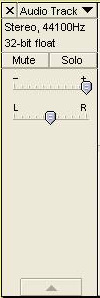
With everything in place, turn on your player and prepare to drop the needle onto the record. Hit the red record button in Audacity and begin playing the record. As it plays, the sound is represented by the audio graph in the center of the window. If your record is in Stereo, you should see two separate sets lines, one above the other. Watch to see whether the lines form 'peaks' -- this is a sign that the program is actually picking up the incoming audio and not just recording dead air (represented by a flat line with no fluctuations). The larger the peaks, the louder the audio being picked up.
Let the dub run for 30 seconds or a minute and then hit 'Stop'. Pull the arm off the record. In the 'Audio Track' pane to the left of your wavy lines, move the first slide-switch (the one with plus and minus) all the way to the right. This will increase the gain to maximum, ensuring you're hearing as much of the original audio as possible. If this slider is not adjusted, you may find it very difficult to hear your music (even with volume turned way up). Hit 'Play' and see what happens.
Step 4: Dub Your Collection
If the dub was successful, go back and do the record in its entirety (make sure to save the project file after you're done). When completed, play the recording from the top. At the end of the first song, take note of the beginning and ending times (for the first track, the beginning time index will be 00.00.00). Enter the times into the toolbar at the bottom of the window and the first song will be selected.
Click 'File' > 'Export Selection' to save the track as an .mp3 file. The program will also give you the chance to enter the track's meta data. Note that if you hit 'Pause' between tracks rather than 'Stop', the program won't allow you to save the file.
Continue playback and save each individual song the same way. After Side A is completed, flip the record over and repeat the process.
I hope this process helps someone out there looking for an easy way to tackle this kind of project.
What You'll Need
- A turntable with red & white RCA connections
- If your turntable is an inexpensive one and does not have any connections, then you'll require a female-to-female RCA coupler and an RCA to 3.5mm audio cable to link it to a computer.
- If your player does have connections in the back, you'll still need the RCA to 3.5mm cable, just not the coupler.
- A Windows, Mac, or Linux-based computer with Audacity installed and standard 3.5mm audio connections (Line In).
- Records to dub.
Obviously, if you're going to do this job, you'll need a record player. I'm not saying go out any buy a brand-new one; a cheap, used yard sale unit with no bells-and-whistles will work just fine (trust me, that's what I'm using). Make sure the unit works, first, and find out if it has RCA connections and speed controls.
If you find yourself with a player that only has wired-in RCA cables and no jacks, pick up the cable and coupler I listed above. You'll need those to link the player with your PC.
Step 2: Install Audacity & Hook Everything Up
Once you've obtained all the necessary hardware, it's time to download and install Audacity. Audacity is a free, open-source, multi-platform audio-editing program that works really well for dubbing vinyl.
Plug in the record player and run your RCA cables from the player's white and red jacks to your computer's Line In input. If your player only has wired-in cables, connect the red and white plugs to the matching female jacks on the coupler. Connect the RCA connections from your RCA to 3.5mm cable to the other end. Finally, the 3.5mm jack will go into the back of your computer.
Step 3: Configure and Test Your Setup
Before you get too excited and start dubbing an entire record, let's configure everything and make sure the setup works. Carefully pop a record out of its slip case and put it on the turntable. Make sure the playback speed matches what's listed on the record itself. If the label doesn't say either way, take a guess (you'll find out if you guessed correctly after the test dub).
Launch Audacity and adjust the input channel settings on the third toolbar from the top (image below). The record label should also say whether the record is meant to play in stereo (multiple-track audio) or Mono (one-track audio). The easiest way to tell is to play back the record through a set of speakers or headphones. If the sound coming out of both speakers is exactly the same, then the record is in Mono. If different elements can be heard coming from one side or the other, you're most likely in Stereo. Adjust the input settings appropriately.
On the same toolbar, to the left of the input channel settings, check to make sure your input and output devices are the ones you would normally use. You may need to experiment if you're not sure.
With everything in place, turn on your player and prepare to drop the needle onto the record. Hit the red record button in Audacity and begin playing the record. As it plays, the sound is represented by the audio graph in the center of the window. If your record is in Stereo, you should see two separate sets lines, one above the other. Watch to see whether the lines form 'peaks' -- this is a sign that the program is actually picking up the incoming audio and not just recording dead air (represented by a flat line with no fluctuations). The larger the peaks, the louder the audio being picked up.Let the dub run for 30 seconds or a minute and then hit 'Stop'. Pull the arm off the record. In the 'Audio Track' pane to the left of your wavy lines, move the first slide-switch (the one with plus and minus) all the way to the right. This will increase the gain to maximum, ensuring you're hearing as much of the original audio as possible. If this slider is not adjusted, you may find it very difficult to hear your music (even with volume turned way up). Hit 'Play' and see what happens.
Step 4: Dub Your Collection
If the dub was successful, go back and do the record in its entirety (make sure to save the project file after you're done). When completed, play the recording from the top. At the end of the first song, take note of the beginning and ending times (for the first track, the beginning time index will be 00.00.00). Enter the times into the toolbar at the bottom of the window and the first song will be selected.
Click 'File' > 'Export Selection' to save the track as an .mp3 file. The program will also give you the chance to enter the track's meta data. Note that if you hit 'Pause' between tracks rather than 'Stop', the program won't allow you to save the file.
Continue playback and save each individual song the same way. After Side A is completed, flip the record over and repeat the process.
I hope this process helps someone out there looking for an easy way to tackle this kind of project.
Thursday, July 18, 2013
Star Trek Into Darkness: A Review & Comparison
Sorry for the lack of posts this past month. Things have started to heat up (pardon the pun) in the midst of Summer, and I've also been focusing my blogging efforts on building a second blog for a musical ensemble I work with. Stay tuned for several more backlog posts over the next few days.
Star Trek Into Darkness has been a bit of a controversy among hard-core Trekkies and new fans alike. Having seen the movie in 3-D about a month ago, I decided it was time to throw in my two cents. The film is the first sequel to JJ Abrams' Star Trek, the 2009 movie that rebooted the franchise. Much more action-oriented and fast-paced then past Trek films, we follow a still-inexperienced Kirk going after a new and powerful threat to the Federation.
Like many Trekkies suspected from the beginning, the film is essentially a retelling of Star Trek II: The Wrath of Khan (1982), considered by many of us to be the best of the films based on the Original Series. If you're new to Star Trek and haven't seen Wrath of Khan (or the Original Series episode it was a sequel to, "Space Seed") check them out for some perspective. Of course, there are plenty of twists and turns in the plot of STiD to not make it a total rip-off.
The producers definitely went out of their way to replicate some of the most iconic scenes from TWoK, but didn't copy the film line-for-line or plot point-for-plot point. Some may still consider that a cheat, but on the same token, there aren't too many truly original sci-fi films out there these days. I have to give the producers credit for taking some classic scenes and remaking them (mostly successfully) for a modern audience.
The writers also try to show some evolution of Kirk's character in the process, depicting him as a cocky, brash young starship commander who's probably not ready to sit in the Chair. For example, at the beginning of the film, we see Kirk's rather...unique and reckless handling of a Prime Directive situation that nearly looses him his command.
Additionally, the movie introduces us to the new-universe counterpart of Carol Marcus, who, strangely enough, resembles Dr. Elizabeth Dehner (from TOS 'Where No Man Has Gone Before') far more closely than the TWoK Marcus. Why two unrelated characters were essentially merged is a mystery to me. Other than the familiarity of Dehner to TOS fans, there was really no reason to do this.
There are also hints of other previous Trek movie plots in the film, such as the destruction of the Enterprise (the poster above), the death and resurrection of a main character, conflict with the Klingons, etc. It makes one wonder where the producers plan to take the film series from here -- they've already managed to use many of the best elements from past films, already had an origin story and a movie focusing on a villain. Modern film-making won't allow another light-hearted movie like Star Trek IV, or a Cold War story like Star Trek VI. Despite all this and Abrams' commitments to Disney's new Star Wars trilogy, Star Trek 3 has recently been green-lighted for release in 2015.
Overall, STiD is a good action/adventure sci-fi film as long as you're not expecting some of the deeper messages (life, death, sacrifice, friendship, etc.) found in TWoK or a menacing villain like the original Khan. It's definitely worth seeing in 3-D if you don't mind the expense.
Star Trek continues.
Subscribe to:
Posts (Atom)
.jpg)


