"Any significantly advanced technology is indistinguishable from magic." - from Arthur C. Clarke's Three Laws of prediction.

Thursday, July 31, 2014

'Prelude to Axanar' released!


Star Trek: Axanar is probably one of the most highly-anticipated, professionally-produced fan films currently in the works. After the release of an official trailer back in June, a short prelude film, Prelude to Axanar, come out earlier this week.

The docu-drama style short introduces us to the world of Axanar, which is set some 20 years prior to TOS during a time of war between the Federation and the Klingon Empire. It's a race for technological and space superiority, with the fate of the Federation itself hanging in the balance.

The film can currently be viewed as an embedded video on the Axanar Kickstarter page. Scroll down to the second video from the top.

UPDATE: the film is also now available in HD on the Axanar YouTube channel.

Monday, June 16, 2014

Incredible new trailer for highly anticipated 'Prelude to Axanar' released!


The first official trailer for the professionally-produced fan film Star Trek: Axanar has been released! The docu-drama-style trailer, which gives us a sneak-peak at the project's introductory short film Prelude to Axanar, is filled with plenty of eye-candy and intrigue. 

“Axanar” takes place 21 years before the events of “Where no Man Has Gone Before”, the first Kirk episode of the original Star Trek.  Axanar is the story of Garth of Izar, the legendary Starfleet captain who is Captain Kirk’s hero.  Kirk himself called Garth the model for all future Starfleet Officers.  Garth charted more planets than any other Captain and was the hero of the Battle of Axanar, the story of which is required reading at the academy.  This is that story.
“Axanar” tells the story of Garth and his crew during the Four Years War, the war with the Klingon Empire that almost tore the Federation apart.  Garth’s victory at Axanar solidified the Federation and allowed it to become the entity we know in Kirk’s time. 
It is the year 2245 and the war with the Klingons ends here.
A truly unique project like none other, the movie seems to be creating its own identity by mixing elements from Enterprise, TOS, and the new JJ Abrams continuity. At the same time, the movie explores a long-forgotten aspect of Trek lore from an unlikely source, the third season episode 'Whom Gods Destroy'.

If this new trailer is any indication, Axanar has the potential to be one of the best, if not the best, fan productions to date. The film could also very well prove that high quality sci-fi is no longer limited to major studios. Series like Star Trek: Phase II and Star Trek Continues have already more than shown this to be feasible, but this film could very well take it to a whole new level.


Thursday, May 8, 2014

Starship Exeter releases long-awaited final Act of 'The Tressaurian Intersection'

After an eight-year hiatus, Starship Exeter's 'The Tressaurian Intersection' has finally been completed!

GIF courtesy of www.thelogbook.com
Starship Exeter follows the adventures of the new crew of the starship Exeter, which originally appeared in the TOS episode 'The Omega Glory'. Filmed in 2004 and released in segments over the next several years, Act III of 'The Tressaurian Intersection' left viewers with a massive cliff-hanger that wasn't resolved until last week.
"Searching for a starship in distress, the crew of the Starship U.S.S. Exeter finds a destroyed starbase and a deepening mystery. Has an enemy species from Captain Garrovick's past invented the ultimate weapon, or is the truth even stranger and more deadly?"
A major improvement over the series pilot, 'The Savage Empire', 'The Tressaurian Intersection' has, for years, been widely praised by fans for its quality, production values, and excellent writing. And rightly so. This episode has managed to capture the 'feel' of TOS so well that one may forget they're watching a fan-produced show.

If you've never seen this classic fan production (or its new epic conclusion) before, check it out on YouTube below. Although, to my knowledge, no further episodes will be produced, the show has clearly set a high standard for anyone entering the Star Trek fan film business. It's also a great example of a 'dead' production brought back to life, something that often doesn't happen with projects such as this.

"Space. Endless. Silent. Waiting. This is the new odyssey of the starship Exeter..."


Thursday, February 20, 2014

5 Apps for keeping your PC lean, mean, and infection-free


Let's face it: the Internet is a dangerous place.

In this case, I'm not referring to cyber crime, but cyber security. Even the best-informed can get into trouble with a single click. One bad file has the potential to turn a system into a useless paperweight. One could go out and spend considerable money on an Internet security suite, or piece together your own from the best free apps on the Web. In concert, the following five apps not only provide excellent virus/malware protection, but also keep your system running smoothly.

Avast! Free Antivirus
Like many anti-virus programs, Avast has had its ups and downs over the years, but it's currently one of the best free options out there. Boasting a Windows-8-style 'tile' interface, Avast! Free is comprised of a number of modules, or 'shields', to protect different aspects of your computer. These can be configured/disabled individually depending on the user's needs. Notable features include boot-time scan, real-time scan, virus chest, and audible warnings. Although completely free, the program must be re-registered every year by obtaining a free key from Avast.

In addition to the desktop version, Avast also offers a mobile security suite for Android.


Malwarebytes Anti-Malware
Malwarebytes is considered by many to be the best free anti-malware tool on the Web. It's known for being able to detect malware that others programs miss. The free version allows users to scan for and remove malware from a simple, no-frills interface. The paid version takes that step farther with real time protection, scheduled scans, and a flash memory scanner.

An Android app is also available.


Comodo Free Firewall
A firewall is a must-have for any computer with an Internet connection. At its core, a firewall prevents unauthorized parties from accessing a computer from an outside network, such as the Internet (or vice versa). Comodo may not be the best, but it's a solid option that's more than sufficient for the average user. In fact, Comodo's many personalized security alerts may get tiring after a while, but that's a small price to pay for system security. Originally part of a larger Internet security suite, Comodo Firewall can now be downloaded as a separate application.


IObit Smart Defrag
Although not strictly a 'security' application, IObit's Smart Defrag is a great alternative to the Windows Disk Defragmenter. It can help to speed up a system's file access by clumping together bits of data that are part of the same file, but strewn across the hard drive. Considered 'the world's fastest defragmenting engine', Smart Defrag can be setup to run in the background automatically (when a system is idle), at boot, or manually by the user.


Piriform CCleaner
From a security standpoint, CCleaner is a great utility for clearing browser history and Internet temp files, which can not only eat up large amounts of drive space, but also harbor infections. CCleaner can also remove unwanted registry keys, although this isn't recommended unless you're comfortable editing the registry.


DISCLAIMER: It goes without saying that these aren't the only options available. There are plenty of other pieces of free software that may do the job just as well or perhaps better. I'm not an expert in system security, and make no guarantees that this collection of programs will prevent all infections. However, if you're looking to bolster your defenses or are installing security software for the first time, I've had great success using these myself.

Tuesday, February 11, 2014

ST Continues releases message-heavy 'Lolani'

Star Trek Continues 'Lolani'
The renowned fan series Star Trek Continues has done it again. After a live screening in Dallas, the show's second full-length episode was released this past weekend via YouTube.

In this installment, "a survivor from a distressed Tellarite vessel puts Captain Kirk and his crew into a moral quandary over her sovereignty."

Although the plot may not be original, the delivery is excellent, leaving the viewer wondering about the moral implications of slavery. With several other themes such as love, freedom, and justice, this tale would have fit right in amongst Classic Trek's not-so-subtle message stories.

Like its predecessor, 'Pilgrim of Eternity', 'Lolani' is a great episode in almost every respect. The show's sets, props, and special effects are all top-notch, while remaining faithful to The Original Series. The acting and characterizations are spot on. Even the two alien ships appearing in the production look like they could have been designed in the '60's. The producers have clearly learned from other fan series, releasing two high-quality shows right off the bat.

Not only does 'Lolani' explore an age-old issue in-depth, but also presents us with several strong female characters to offset the male leads. Besides Lolani herself, we also have the new ship's counselor, Dr. McKennah, who's clearly not afraid to stand up to her captain.

The episode also features several former sci-fi stars, including Lou Ferrigno (The Incredible Hulk) and Erin Gray (Buck Rogers in the 25th Century).


After a successful Kickstarter campaign, Star Trek Continues now has the funding for three additional episodes. New to the series? Check out STC's previous show 'Pilgrim of Eternity' and three short vignettes.

Friday, January 31, 2014

'Project: Potemkin' releases 'The Night the Stars Fell from the Sky'

Project: Potemkin is a Star Trek fan series set in 2296, not long after the events of Star Trek VI.

The show centers around the exploits of veteran Starfleet captain Alec Grigory and the starship Potemkin. The last Constitution class ship still in service, the vessel has a unique crew of mostly inexperienced offers who continue the tradition of going boldly.

Filmed in Southwest Georgia (US), Project: Potemkin has released eight short vignettes and two full-length episodes. Although not on the same 'level' as many professionally-produced series, the show is definitely worth checking out.

Project: Potemkin's latest release is 'The Night the Stars Fell from the Sky'. After discovering M-rays on a primeval world, the crew must unravel the dark secrets of the planet's inhabitants.

'Night', overall, is a very solid episode that nicely ties in with established Original Series cannon. The fact that Potemkin's officers are supposed to be inexperienced is clearly reflected by the actions of this episode's central Vulcan character, Ensign T'Noshi. Although the acting across the board feels a bit stiff at times, it gets the job done.

The episode's sets and special effects are, for the most part, well-done for a fairly low-budget production. The ship's bridge feels a bit cramped, but showcases a nice blend of TOS and movie-era tech. Planet-side, the show makes use of greenscreen (combined with real-world footage) to create background imagery and the large-scale structures. The end result is fairly convincing. Space shots of the ship and planet are also CG; it's by no means high end, but adequate.

The uniforms worn by the crew are a bit of a TOS or Motion Picture throwback, not at all resembling the militaristic, maroon uniforms introduced in Star Trek II. It was good to see, however, that all the officers were finally given Starfleet chest insignia, something that was absent in previous episodes. Using these 'simplified' uniforms instead of the much more complex movie versions was clearly a cost-saving measure, but it really doesn't take away from the show.

The moral decision at the center of this episode is one that's been used many times before to great effect, and was just as effective here. My only real complaint was the captain's stance on this issue near the end of the episode. Although, to some degree, he rectified this in the final moments of the show, irreparable damage was already done. It's interesting to compare this to other similar situations in Trek, if for no other reason than to see the other side of the coin.

Despite Project: Potemkin's limited resources, the show is very watchable and a highly-respectable fan effort. As long as you're not expecting a Phase II-quality production, this is definitely worth taking a peek at.

Interested in writing a screenplay? Potemkin is currently accepting script submissions, something you won't find with many other productions.

'The Night the Stars Fell from the Sky' and previous installments can be viewed or downloaded here.

Wednesday, January 29, 2014

Tech Tutorial: Change a Video's Aspect Ratio Using VirtualDub

Recently, I was working on a video editing project in which I needed to change the aspect ratio of several clips to match the rest. After trying many free and trial programs that didn't give me the results I wanted, I stumbled upon VirtualDub.

VirtualDub is a "video capture and video processing utility for Microsoft Windows...designed to process linear video streams, including filtering and recompression." If you need to convert those pesky files but don't want to pay for it, this is a quick and easy solution.

At first glance, VirtualDub isn't much to look at, and doesn't appear very user-friendly. Don't let this discourage you -- VirtualDub is a powerful tool that gets the job done, and is quite usable even if you're not a multimedia expert. Just bear in mind that VirtualDub is not a general-purpose video editor; instead, it provides a few key tools to aid in your editing endeavors.

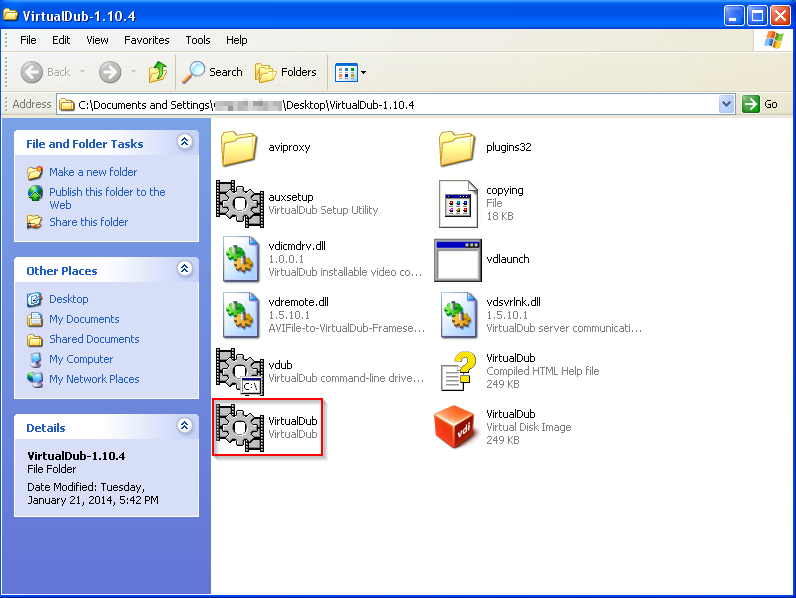
  • Download VirtualDub and extract the files from the zip archive. Launch the application (it's self-contained and requires no installation).

VirtualDub folder.
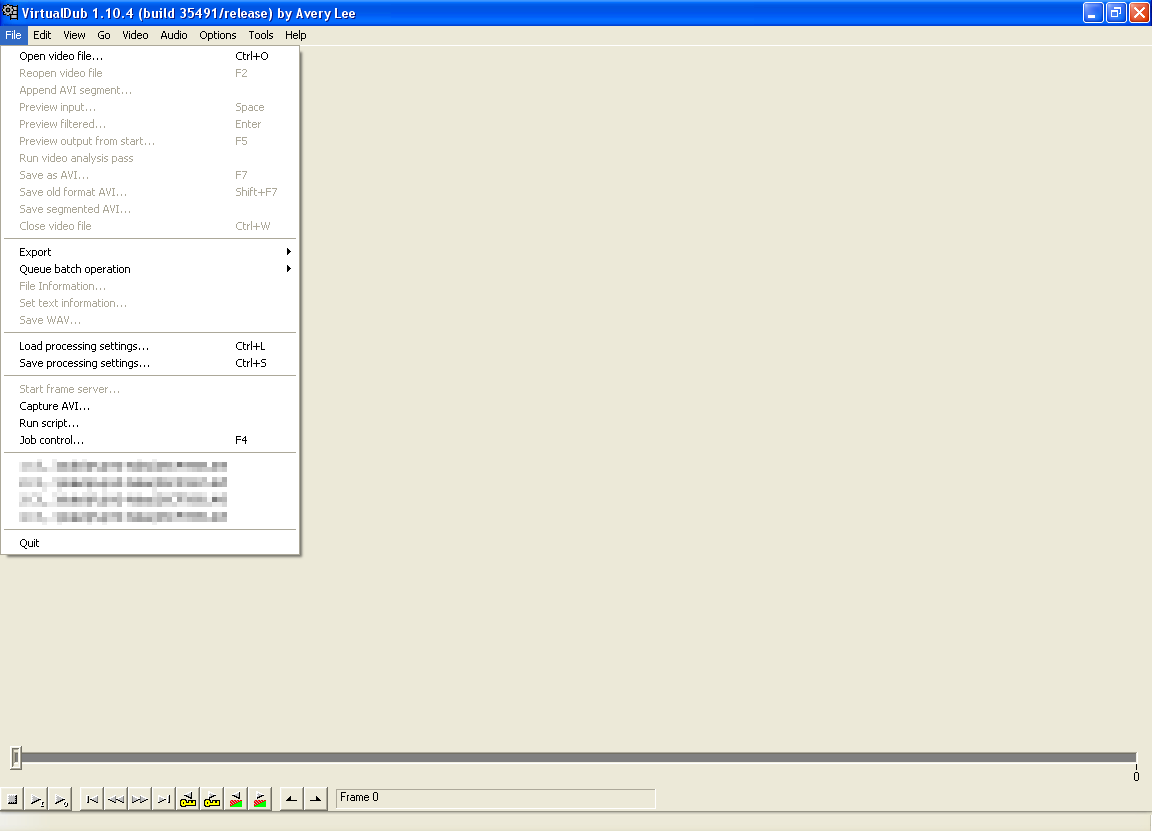
VirtualDub main window prior to video import.
  • Go to 'Video' > 'Filters'.

  • Click 'Add'. A new window will appear with a list of various filters. Scroll down to near the bottom of the list and select 'resize'. Click 'OK'.

'Add Filter' window.

  • Another new window will appear. Under 'Framing Options', click 'Crop to aspect ratio' and enter your desired aspect ratio (16:9, 4:3, etc.) in the fields below. Click 'OK'.
    • Note that selecting one of the letterbox options will add black bars to the top and bottom of your video. 
    • Inputting your desired pixel size in the 'Size Options' section allows you to manually crop a video beyond standard aspect ratios.

'Framing Options' window.

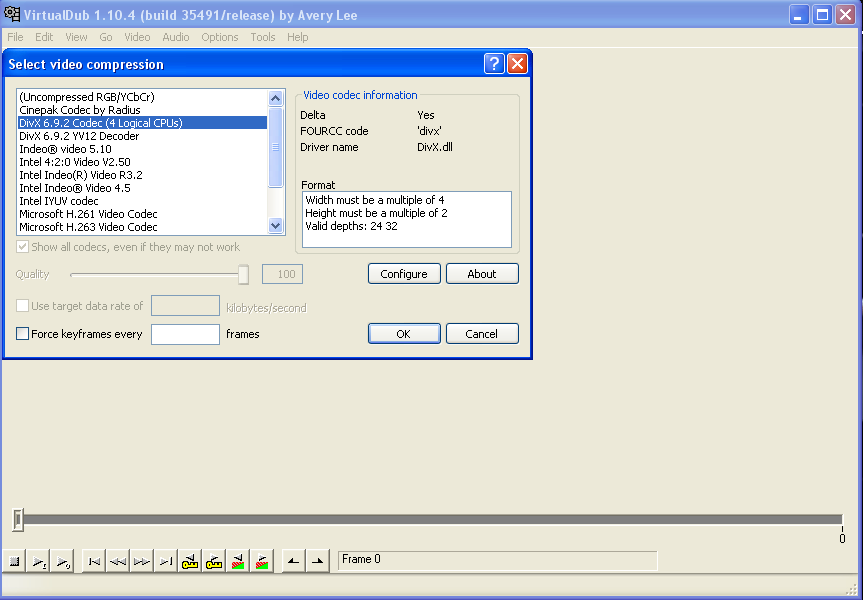
  • To compress your video, go to 'Video' > 'Compression' and select your desired compression codec. Click 'OK'.
    • Choosing to leave your videos uncompressed will result in very large file sizes.
    • Generally, the first DivX option is a good choice, but note that the codec you wish to use must already be installed on your computer.

'Video Compression' window.

  • Click 'File' > 'Open Video File' to import your clip.
    • If you're working with MPEG-4 files, download this unofficial Ffmpeg Input Driver (as the program does not support this format out-of-the-box).
    • Open either the 32 or 64-bit folder (check your version of Windows) and copy the contents into the 'plugins32' (or 'plugins64') folder of the VirturalDub directory.
    • In addition, if your video is encoded in H.264, this codec will allow you to open the file and save it without any DivX errors.

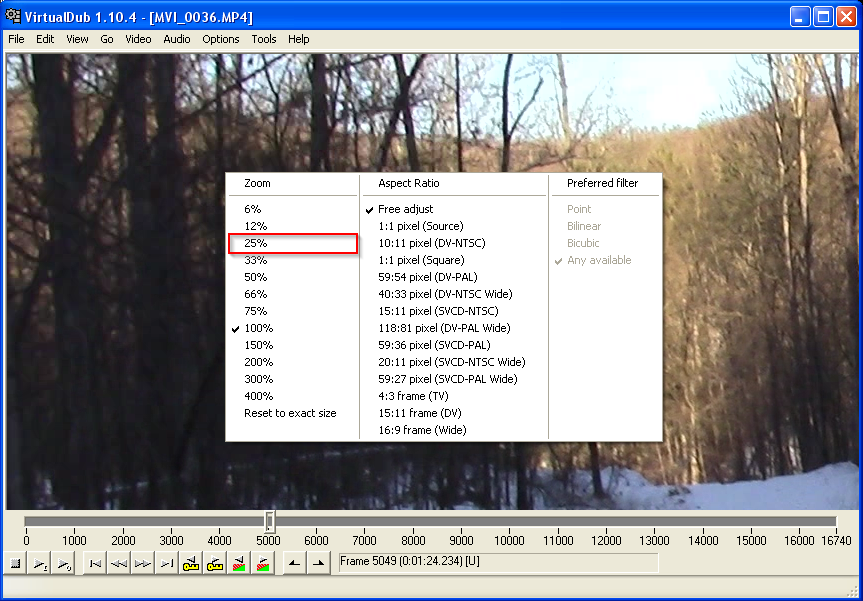
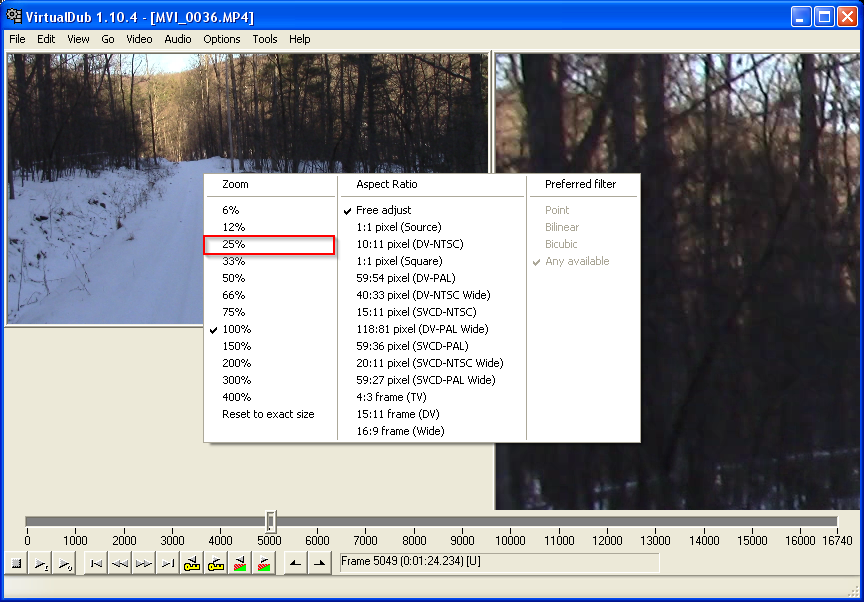
  • After the video has been imported, you may find that the video is too large for the window. Simply right click on it and select 25% to reduce the size. In doing this, a second video window will also become visible. Select 25% for this second window.
    • The window on the left displays your original video, while the one on the right shows what it will look like after conversion.

Resizing the left video window.
Resizing the right video window.

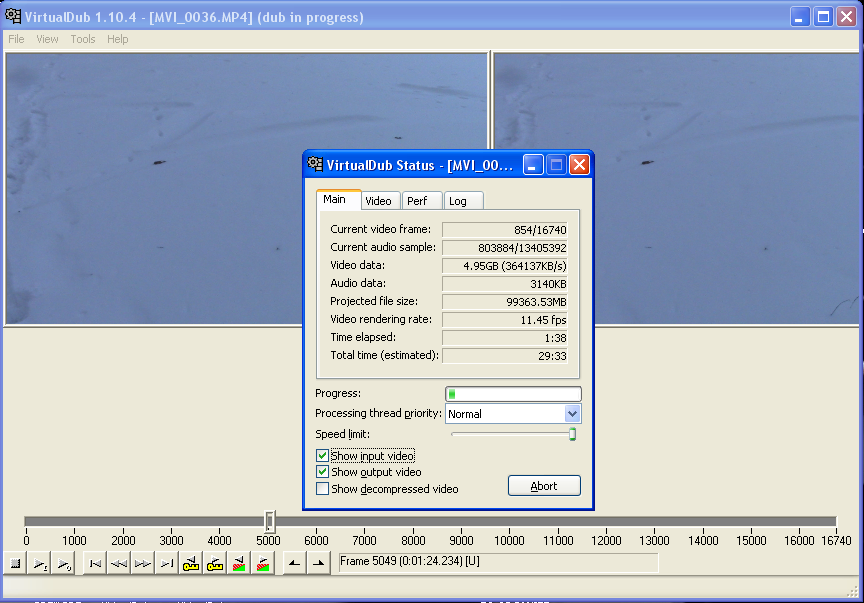
  • Click File > Save as AVI.
    • If you receive the error "source image format is not acceptable", see here.
Video dub in progress, converting from 16:9 to 4:3.

There you have it, a quick and easy way to alter the aspect ratio of a video clip. I hope you've found this quick tutorial useful!